Mobile PDF scanner and editor with AI document assistant
Pagrix: PDF Scanner Editor from SIDAL DEV converts Android devices into portable offices, designed for business professionals and remote workers. It combines high-definition scanning, OCR, and PDF editing to digitize and prepare documents on-device. The app also offers an AI assistant for summarization, Q&A, and translation along with signature and form filling tools. Pagrix targets freelancers, students, and office users who need an all-in-one document workflow on their phone.
What Pagrix is built to handle in a professional workflow
Pagrix is a mobile document lifecycle tool focused on capturing, converting, and preparing paperwork for business use. The app performs high-definition scanning with automatic edge detection and cropping and includes OCR text recognition to extract editable text from printed pages. These capabilities suit situations where users must move paper documents into editable formats quickly and maintain text fidelity for downstream editing or archiving.
How the app structures core workflow and document output
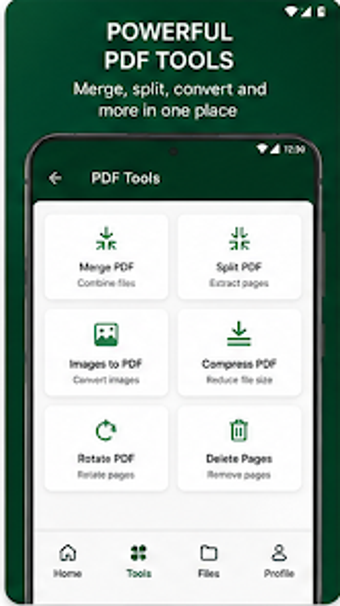
The typical flow in Pagrix moves from capture to output: scan, run OCR, edit, then export. The tool can merge, split, compress, and convert JPG, Word, and Excel files into PDFs, enabling clear deliverables for client reports or internal records. Built-in text-to-speech supports hands-free review, while electronic signature and form-filling tools let users finalise contracts without printing or manual scanning steps.
Onboarding, interface elements, and the AI assistant in practice
The app integrates a Gemini AI assistant that can summarise long documents, answer specific PDF questions, and translate text into more than 20 languages, which reduces manual reading time for long reports. Pagrix provides editing functions such as annotation, highlighting, and erasing, and these are accessible from the same interface, reducing context switching. OCR and AI features work on-device so core functions remain available offline, supporting privacy-conscious workflows.
Compatibility, performance, and reliability for team handoffs
Pagrix supports common document interchange by converting multiple formats to high-quality PDFs and organising files into folders for sharing. Password encryption and offline mode protect sensitive files during transit. The scanner engine is noted for speed and quality, which matters when processing many pages; file management tools like merge and split help prepare packets for handoffs to colleagues or archival systems.
Pagrix suits mobile professionals who need end-to-end document handling
Pagrix is a practical option for professionals who need on-device scanning, OCR, and document preparation with AI-assisted summarization. One trade-off is that advanced AI interactions and bulk enterprise workflows may require workflow adjustments before integrating with team systems. Pagrix suits anyone managing mobile-first paperwork who values integrated capture-to-signature capability on Android devices.